



Does VPN protect you from viruses?
Share this post


Ever wondered if a VPN is enough to keep you safe or you really need antivirus protection too because as long as you are on the internet, you will encounter virus threats, data breaches and malware etc. People often ask questions like, “if i’ve got a VPN, do I still need an antivirus app?” or “does a VPN protect you from viruses?”
These are important questions, but a simple “yes” or “no” doesn’t fully capture how complex modern threats are. While a VPN is a useful security tool, it serves a different purpose than antivirus or anti-malware software.
To truly understand if a VPN stops viruses and malware and then how to protect your digital life, we must understand how antivirus works and how VPNs work. Let’s move on and understand where these two technologies overlap and where they leave you exposed.
VPN vs. Antivirus
To clear the confusion, we first need to establish what each tool is actually built to do.
What does a VPN do?
A VPN hides your IP address and encrypts your data, making it difficult for anyone to see or intercept your activity while you are online. It also helps keep your browsing more private. A VPN gives you a secure tunnel to browse
That said, a VPN will not protect your device from viruses or warn you if one is detected. Its main purpose is to secure your data and help you get around restrictions like blocked websites or censorship.
If you need malware or virus protection, you should use antivirus software.
When do you need a VPN?
A VPN secures you on any public Wi-Fi. It encrypts your precious personal data to prevent “Man-in-the-Middle” (MitM) attacks on open networks.
A VPN does not stop viruses but it does stop your ISP from tracking your browsing history, selling your data, or throttling your connection. You also need a VPN to unblock any geo-blocked website online. It helps you quietly bypass any regional censorship or network blocks to access your desired URL.
What does an antivirus do?
Antivirus (AV) software is an internal guard built to find and remove harmful programs like viruses and worms from your computer. It works to catch these threats early and lets users run regular scans for ongoing protection.
Paid antivirus options usually offer more features than free versions, including the ability to detect and remove infected files and spyware like keyloggers and other hidden threats.
They are also flexible and available on different devices, so you can use antivirus protection on your Android phone, Mac, and more.
When do you need an antivirus?
For accidental downloads: Identifies and blocks malicious files the moment they hit your storage after an accidental download.
Against Ransomware: Monitors for unauthorized encryption behavior and kills dangerous background processes.
Proactive email scanning: Modern antiviruses (AV) flag malicious links and attachments in your local mail client before you can click them.
So, does a VPN protect you from viruses? A standard VPN does not protect you from viruses. If you download a malicious .exe file while connected to a VPN, the VPN will happily encrypt that virus and deliver it safely to your hard drive. Once the file is on your computer, the VPN’s job is over; it cannot scan the file or stop it from infecting your OS.
How does a VPN save you from viruses?
A VPN does not directly protect you from viruses, but it does help secure your data through encryption, which can reduce certain risks linked to malware.
It can limit how malware operates
A VPN can make it harder for malware to do its job. Since VPN servers often restrict ports, malicious programs may struggle to connect with their source to send or receive data.
It can help block harmful ads
Some VPNs include features like ad blockers. These can stop malicious ads and unsafe content from loading, lowering the risk of malware exposure while browsing.
Premium VPNs layer ad blocking and DNS filtering
The industry is shifting and you might wonder can you use VPN and antivirus simultaneously? Many premium VPNs are now bundling “Threat Protection” layers. These are not the VPN itself, but are added features. DNS Filtering, which blocks access to known malware sites, and Ad Blocking, which stops “malvertising” from loading in the first place. Stacking these tools ensures that if a threat slips through one layer, the next one is there to catch it.
If you want to learn more about how VPNs help reduce malware risks, you can explore detailed guides that explain the process further.
How viruses and malware bypass a VPN?
To understand why a VPN is not always a silver bullet, we need to look at how infections actually happen. Most modern malware does not rely on intercepting your network traffic; it relies on tricking the user or exploiting software vulnerabilities.
VPNs vs. payload downloads
Imagine you visit a compromised website. A VPN protects the connection to that site and does not inspect the “the actual data”. So, it treats the malicious code just as text and images.
VPNs vs. phishing and social engineering
Phishing is the spreading of malware by tricking users into downloading malicious “updates” or visiting fraudulent sites. A VPN simply encrypts the data during transmission to protect it from hackers and does not know if email or the website are malicious.
VPNs vs. infected USBs and local transfers
Because a VPN only encrypts traffic traveling between your device and the internet, it provides zero protection against a virus introduced via a thumb drive or a shared folder.
Choosing between VPN vs. Antivirus: Do you really need both?
While it is common to ask whether a VPN or antivirus software is “better,” it is a bit of a non-nerdy question to ask because they handle completely different types of threats. To keep your data truly safe, you need both working together.
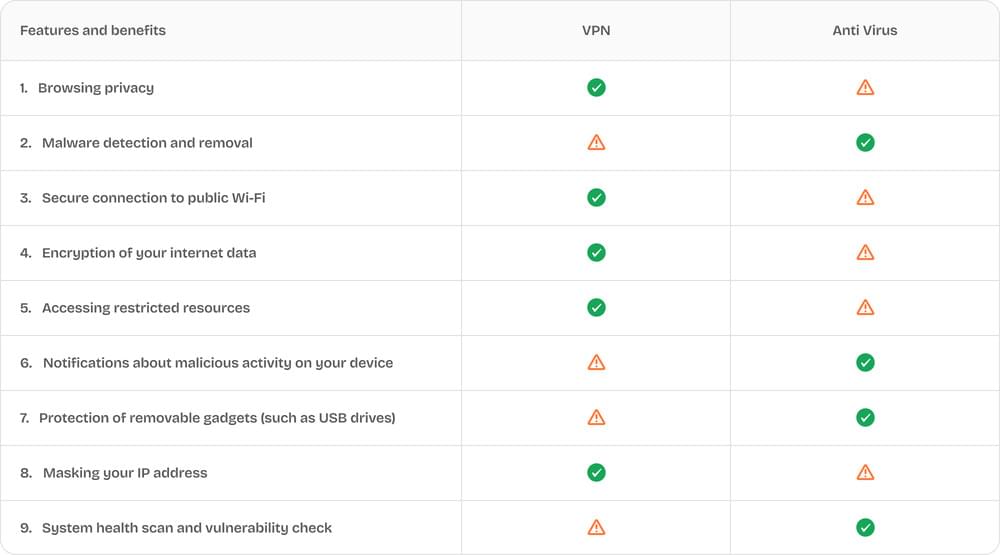
Comparing a VPN to an antivirus is like comparing a room curtain to a home security system. One keeps people from seeing what you are doing inside, while the other stops intruders from breaking in. For a complete defense, you need an all-in-one suit.
Risks a VPN or antivirus cannot protect you from
VPNs and antivirus software can increase your online security, but they’re not a cure-all. A lot of cybersecurity risks are due to human behavior which cause such trouble that even the best technology can not save.
- For example, using weak or easy passwords is another common mistake. Even with strong security tools in place, this habit makes it much easier for attackers to break in.
- If you willingly hand over sensitive information to a scammer, no VPN or antivirus can step in to stop that. The same goes for clicking on shady links or downloading files without checking where they came from.
- Phishing scams where you provide personal or financial details, no VPN or antivirus software can protect you there.
- When you grant apps or websites more permissions than they actually need, you could be giving away access to your data without realizing it.
- And then there’s social media. Sharing too much personal information can make you an easy target for scams or identity theft, regardless of how secure your connection is.
How to practice cyber hygiene in 2026?
Do VPN prevent viruses, No, you need a “day-one” security approach to keep your device clean. Follow this routine to keep your device virus-free:
Use a trusted Antivirus: Use a dedicated AV suite for real-time file scanning and behavior analysis. Regular scans are vital for detecting and eliminating harmful code before it can settle into your system.
Update the OS and apps: Operating systems and apps keep coming with updates and provide new features to protect against online threats. Update them as soon as updates are released.
Use a password manager to prevent theft and enable Multi-Factor Authentication (MFA/2FA). Even if a virus manages to compromise a password, a second layer of verification keeps hackers out of your accounts.
Practice “Zero Trust” Browsing: Be skeptical of every link and attachment. It takes minutes to build a professional-looking malicious site; avoid strange domains and pirated material, as these are primary vectors for infection.
Browse using a VPN: Keep your VPN active so that your IP is masked and your traffic remains encrypted. This is your first line of defense against network-level snooping and ISP tracking.
Verify Before You Download: Never download content from untrusted sources, and stay aware of phishing scams designed to trick you into inviting malware in.
Conclusion:
Different problems have different solutions, just like privacy is not the same as security. Privacy (what a VPN provides) is about who can see your data. Security (what an antivirus provides) is about the integrity of your system.
Use a high-quality VPN like EonVPN for your privacy and data integrity, but never let that replace the watchful protection of a dedicated antivirus. Still wondering, do VPNs help against viruses or do you need virus protection if you have a VPN? Combining a solid AV with a VPN and healthy browsing habits is the only way to stay safe in 2026.
FAQs
Can I still get a virus if I use a VPN?
Yes. A VPN only secures the connection between your device and the internet, it does not scan the data. To stop viruses from downloading on your hardware, you still need a dedicated antivirus.
Is VPN the same as antivirus?
No. They are two different tools with two different jobs. VPN protects your connection, while an antivirus protects your device.
I have a VPN, so can I visit any site safely?
In this case, you are “private,” not “invincible.” You can still be phished, and you can still download malware on a “shady” site. In your case, the VPN just makes sure your ISP does not know you visited that shady site.
Do VPNs prevent viruses?
No. A standard VPN cannot detect or delete a virus. However, many modern VPNs now include “DNS Filtering” or “Threat Protection” features. These can help prevent a virus by blocking your access to known malicious websites, but they cannot replace the deep scanning feature provided by an antivirus.