



Instagram unblocked: Why it is blocked and what you can do
Share this post


Instagram blocked on school or work Wi-Fi is one of the most common network blocks there is. Schools, offices, libraries and some public Wi-Fi networks filter it, so the app stops loading and instagram.com shows an error or a block page.
This guide is about Instagram blocked by a network. If a person blocked you on Instagram, that is an account setting and no network fix changes it. Below you will see why networks block Instagram, how the block works, and the safest ways to get Instagram unblocked on a Windows PC.
Why do networks block Instagram?
Networks block Instagram for a few common reasons.
- Focus. Schools and employers block social media during class or working hours.
- Rules and safety. Many schools filter social sites as part of their child safety policies, and some filter whole categories by default.
- Bandwidth. Reels and Stories are video, and video uses a lot of data on a shared network.
How networks block Instagram
Knowing how the block works tells you which fix will help.
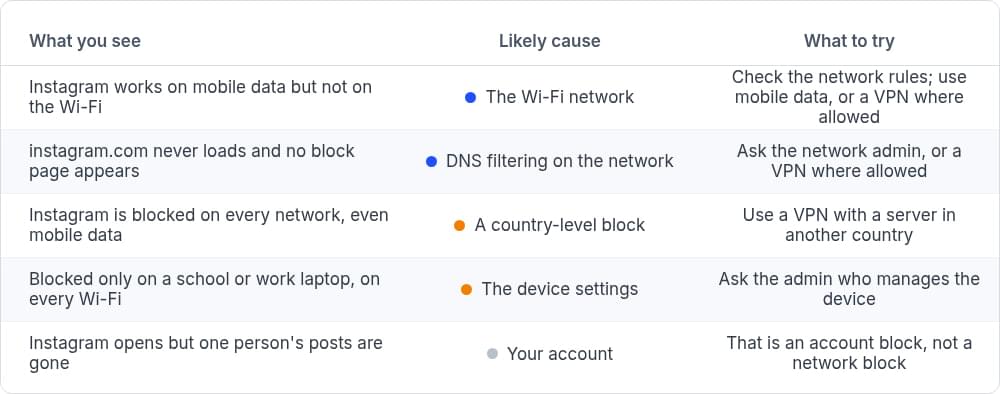
- DNS filtering. The network refuses to look up instagram.com, so the browser cannot find the site.
- Web filters and firewalls. Tools that use web filtering read the address you visit and block anything in the social media category. This is the most common setup in schools and offices.
- IP blocking. The network blocks the server addresses Instagram uses.
- Managed devices. On a school or work laptop, the block can sit on the device itself, so it follows you onto any network.
The same tools let a network owner log the sites you visit. Our guide to what a Wi-Fi owner can see explains what is visible and what is not.
A quick test: if Instagram works on mobile data but not on Wi-Fi, the Wi-Fi network is blocking it. If it fails on every network, the cause is probably not a network block: check whether Instagram is down or the app needs an update.
Get Instagram unblocked with a VPN on Windows
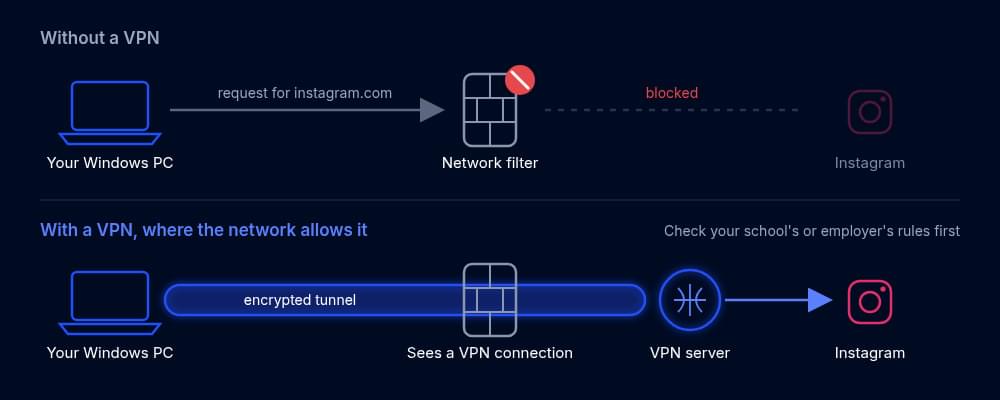
Check your school’s or employer’s acceptable-use policy first. Where personal devices may use a VPN on the network, a VPN on your own Windows PC is one way to get Instagram unblocked: it encrypts your traffic between your PC and the VPN server, so the network sees a connection to that server. The network can still see that you are using a VPN, many policies forbid it, and some networks block VPN connections, so ask IT if you are not sure.
To use one on your own Windows PC:
- Download EonVPN and install it on your Windows PC. EonVPN is a Windows app, so it will not help on a Chromebook, a Mac or a phone.
- Open the app, create an account or sign in, and connect to a server.
- Open your browser, go to instagram.com and log in.
- If the page still does not load, clear the browser cache or open a private window, then reload.
Some networks block sites at the DNS level, so it also helps to keep DNS lookups inside the VPN tunnel. If Instagram still does not load after you connect, flush the DNS cache on Windows and try again.
VPNs are legal in most countries, but using one to get around a school or workplace filter can break that network’s rules. Check the policy first.
Other ways to open Instagram
If you cannot install apps on the device, these options can still help.
Switch to mobile data or a hotspot
A school or office filter only covers its own network. Turning off Wi-Fi on your phone, or sharing your phone’s connection with your laptop, moves you to your mobile carrier, which usually does not block Instagram. It uses your data plan quickly if you watch Reels.
Try Instagram on the web instead of the app, or the other way round
Some networks block the Instagram website but allow the app, or the reverse. If one works and the other does not, the network allows that one. Use it within the network’s rules. Strict filters usually block both.
Skip proxy sites
A web proxy loads Instagram through its own server. School and office filters block most of them, using one to get round the filter usually breaks the network’s rules, and your username and password pass through a site you know nothing about, which is a common way accounts get stolen.
Ask for access
If you manage social media for a club, a class project or your job, ask the IT team to allow Instagram for your account. Many schools and companies make exceptions for specific roles.
Instagram on a school-managed Chromebook
School Chromebooks are controlled by the school’s admin console. Students usually cannot install a VPN, change DNS settings or add extensions, and the filter often stays active at home too. On these devices, the realistic options are your own phone on mobile data, using Instagram on a personal computer, or asking the school.
On your own Windows PC on school Wi-Fi, check the school’s acceptable-use policy before you use a VPN; many schools forbid them.
If someone blocked you on Instagram
Many people searching for “Instagram unblocked” mean an account block, not a network block. These work differently.
- If you blocked someone and want to undo it, open their profile and tap Unblock. You can also go to your profile, tap the menu in the top right, then under Who can see your content tap Blocked, and tap Unblock next to the account.
- If someone blocked you, only that person can unblock you. A VPN, a new network or a proxy site does not change it, and creating new accounts to get around a block can break Instagram’s rules.
Instagram’s Help Center explains how blocking and unblocking works.
Keep your account safe after you get access
Whichever way you get Instagram unblocked, logging in from a new network can trigger Instagram’s security checks, so:
- Turn on two-factor authentication before you switch networks.
- Never enter your Instagram password on a proxy site or an “Instagram unblocked” mirror. If you already did, follow the steps in what to do if you click on a phishing link.
- Be careful with DMs or emails that claim to be from Instagram support and ask for your password or a login code. They are among the most common types of phishing attacks.
- If Instagram asks you to confirm a login from a new location after you connect to a VPN, that is normal. Confirm it from your email or phone.
- If you keep getting logged out, stay on one VPN server instead of switching between servers.
Conclusion
When Instagram is blocked, first work out where the block comes from. On school or office Wi-Fi, check the network’s rules first: your phone’s mobile data is a separate connection, and a VPN on your own Windows PC is an option only where the policy allows it. On a managed school device, use your own device or ask for access. Keep your login away from unknown proxy sites.
FAQs
What can I do if Instagram is blocked at school?
Check your school’s acceptable-use policy first, and ask whether Instagram is allowed, for example for a club or project. Your phone’s mobile data is a separate connection from the school Wi-Fi. A VPN on your own device is only an option where the school allows personal VPNs. On a school-managed Chromebook, use Instagram on your own phone or computer instead.
Why is Instagram blocked on my Wi-Fi?
The network owner has blocked it, usually with a web filter or DNS filter. Schools and offices do this to limit distractions and save bandwidth. If Instagram works on mobile data, the Wi-Fi network is the cause.
Is it legal to use a VPN for Instagram?
VPNs are legal in most countries. Using one to get around a school or workplace filter can break that network’s rules, so check the policy before you connect.
Will a VPN unblock Instagram if someone blocked me?
No. If a person blocked your account, that is an Instagram setting. A VPN only helps when a network is blocking the site.
Can I unblock Instagram without a VPN?
Yes. If the block is only on the local network, your phone’s mobile data is a separate connection, and the network admin can allow Instagram for your account. If the website is blocked and the app works, or the reverse, the network allows that one.
Is it safe to use Instagram unblocked sites?
Be careful. Mirror and proxy sites can capture your login details. Use the real instagram.com or the official app, on a connection where Instagram is allowed.