



Is Urban VPN safe? What its privacy policy says
Share this post


Urban VPN is one of the most downloaded free VPNs around. Its homepage calls it “the only 100% FREE, 100% fast & 100% anonymous VPN in the world” and says it is trusted by more than 100 million users. That is a big promise for a service that costs nothing. So is Urban VPN safe? Is it spyware? And how does a free VPN pay for hundreds of servers? We went through Urban VPN’s own website and privacy policy as they read today, plus a security report about its browser extension, so you can decide for yourself.
What is Urban VPN?
Urban VPN is a free VPN service run by Urban Cyber Security Inc., which The Hacker News describes as a Delaware-based company. It comes as a Windows desktop app, browser extensions and mobile apps. According to its homepage, it offers “350+ VPN locations” and lets you “choose from 82 VPN countries”.
There is also a paid tier called Urban VPN Premium. Its premium page lists “652+ Premium VPN servers in 89 countries” and protection for up to 8 devices.
Like any VPN, Urban VPN routes your traffic through one of its servers so websites see the server’s IP address instead of yours. If you want to see what websites see right now, check your current IP address.
Is Urban VPN safe?
The short answer: Urban VPN will hide your IP address from the websites you visit, but it is not a private VPN. Its own privacy policy says its parent company is a data broker, and that browsing data collected through its services can be de-identified and shared for market intelligence.
So the answer depends on what “safe” means to you:
- Safe from malware? We found no evidence that the Urban VPN Windows app itself is malware.
- Safe for privacy? Not by the standard most people expect from a VPN. A VPN’s main job is to keep your browsing away from third parties, and Urban VPN’s business model is built on using browsing data.
A VPN can only protect you from the parties it does not share data with. If the VPN provider itself collects your activity, it becomes one more party tracking you.
How does Urban VPN make money?
Running VPN servers costs money, so every free VPN has to pay for them somehow. Urban VPN is fairly open about two revenue sources.
The first is its paid plan. Urban VPN’s why free page says “Premium users receive additional features and priority access to fast servers.”
The second is data. The Urban VPN privacy policy (last updated September 4, 2026) states:
“Please be aware that our parent company is a data broker (“Data Broker”), meaning you data may be sold or shared with our parent company’s clients…”
The Hacker News names BIScience, an ad intelligence and brand monitoring firm, as the company that owns Urban Cyber Security Inc.
This is the same trade-off behind most targeted advertising: when you are not paying with money, you are often paying with data.
What the Urban VPN privacy policy says it collects
Here is what the current Urban VPN privacy policy lists, in its own words where possible. The policy covers “Urban VPN and Urban Premium VPN Desktop EXE software for Windows, available in free or subscription-based versions”, so it applies to the Windows app as well as the extensions.
Browsing and activity data. The policy says this “includes URL referrer, URLs viewed or visited, pages ads viewed or clicked, ad URL, search engine results page data”. It adds: “We also use and disclose the Browsing and Activity Data for market intelligence or analytics purposes.”
E-commerce data. The policy says this includes “actions on ecommerce websites, such as purchases, time and date, the products purchased, prices”.
AI inputs and outputs. The policy covers prompts and responses from AI chatbots such as ChatGPT, Gemini, Copilot, Claude and Perplexity. It says de-identified data is disclosed “for market intelligence or analytics purposes, including to provide digital intelligence insights to our business customers.”
Usage logs and IP addresses. Usage data includes “logs (i.e., time of access and duration of use)”. The policy says IP addresses are “trimmed and hashed … on a daily basis”.
How long it keeps the data. Browsing and e-commerce data is de-identified and aggregated within 90 days.
Where it goes. Data may be transferred to Israel, the United States and other countries.
Opting out. You can opt out or turn off permissions, but the policy warns that “once you opt out or turn off the permissions, some or all of the Services will no longer be available.”
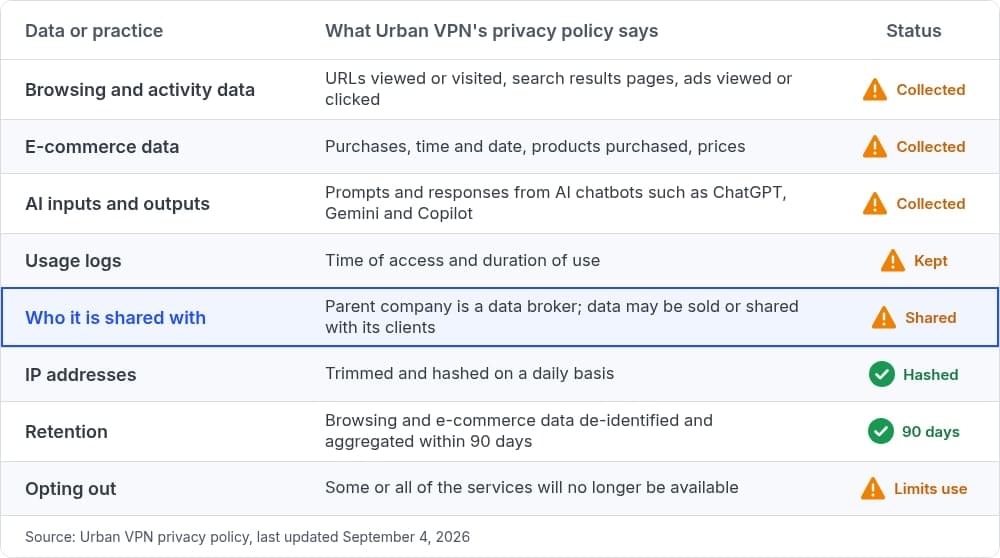
To be fair, Urban VPN says that in most cases the data its business customers receive is anonymized and de-identified. The same policy also says it “may sell or otherwise disclose raw Personal Information to our affiliates or parent company” so that they can de-identify it. And the URLs you visit, your search results, your shopping activity and your AI prompts can be very personal, so it is worth knowing they are collected at all. If you are already careful about cross-site tracking, this is the kind of collection you are trying to avoid.
The Urban VPN browser extension AI chat report
In December 2025, The Hacker News reported on research by Koi Security about the Urban VPN Proxy browser extension. The key points from that report:
- The Chrome extension carried a “Featured” badge and had around six million users.
- Starting with version 5.5.0, released on July 9, 2025, it harvested prompts and responses from AI chatbots, and this was enabled by default.
- The data was sent to Urban VPN analytics domains.
- On the Microsoft Edge Add-ons store, the extension had 1.3 million installs.
- Koi Security found the same AI harvesting code in three other extensions from the same publisher, bringing the total install base to over eight million.
- As of December 18, 2025, the extensions were no longer available on the Chrome Web Store, while the Edge versions remained live at the time of the report (the report was later updated to note all four extensions were removed from the Edge store by December 23, 2025).
One important detail: this report is about the browser extensions, not the Windows desktop app. We are not aware of a similar report about the desktop app. However, the current privacy policy covers both, and it describes the same kinds of data collection, including AI inputs and outputs.
If you use browser extensions for privacy, it is worth reading how safe your browser is and what each extension is allowed to read.
Is Urban VPN free?
Yes, Urban VPN has a free tier, with some limits depending on the platform. According to its why free page:
- “Browser extension and desktop users can access a free VPN connection without bandwidth limits”
- “Android users can enjoy a free VPN connection with a 100MB daily limit, while iOS is available exclusively for Premium users”
The premium page also says free Android users are limited to 5 locations.
So on Windows, the free version is genuinely usable. The cost is not in money but in the data collection described above.
Urban VPN review: pros and cons
Here is a quick summary based on what Urban VPN publishes today.
Pros
- Free Windows desktop app with no bandwidth limit, according to Urban VPN
- A large server list: 350+ locations on the free service, per its homepage
- Clear disclosure in its privacy policy that data is shared with its parent company’s clients
Cons
- The parent company is described as a data broker in Urban VPN’s own privacy policy
- Collects browsing, shopping and AI chat data for market intelligence
- Keeps usage logs, including time of access and duration of use
- Its browser extensions were reported to harvest AI chatbot conversations by default
- Opting out can make some or all of the service unavailable
- Free Android use is capped at 100MB a day, and iOS is premium only
How to use Urban VPN more safely on Windows
If you already use Urban VPN and want to keep it, these steps reduce what it can see:
- Read the permissions and data settings in the app and turn off anything you do not need. Expect some features to stop working, as the policy warns.
- Remove the browser extension if you only need the desktop app. Open your browser’s extensions page, find Urban VPN and click Remove.
- Avoid sensitive tasks while connected. Do not use it for banking, work accounts or AI chats that contain personal information.
- Check for leaks. A VPN should hide your real IP and DNS requests. Here is how to prevent DNS leaks with a VPN.
If you decide to remove it completely, open Settings > Apps > Installed apps in Windows, find Urban VPN, click the three dots and choose Uninstall.
Also keep in mind that a VPN and a proxy are not the same thing. Many browser “VPN” extensions only proxy browser traffic. Our guide on proxy vs VPN explains the difference.
Urban VPN alternative for Windows: EonVPN
If you want a free VPN for Windows without a data broker behind it, EonVPN is an alternative worth trying.
EonVPN is a free VPN for Windows, and there is no need to add a credit card or any other payment method. It follows a strict no-logs policy and never retains logs of your online activity. The EonVPN privacy policy says: “We do not sell, trade, or otherwise transfer to outside parties any information that we might have about you.” It only asks for your email and a password to create an account.
We also want to be clear about how EonVPN stays free. As explained on the EonVPN download page, it remains free by sharing a tiny fraction of your internet connection for secure enterprise traffic. Your own data remains encrypted.
A few more facts about EonVPN today:
- Answers to common questions in the EonVPN FAQ
- Available on Windows only for now
Getting started takes a few minutes:
- Download EonVPN and install it on your Windows PC.
- Create your EonVPN account.
- Select a server and click Connect.
Conclusion
Is Urban VPN safe? It will hide your IP address, and we found no evidence that the Windows app is malware. But by its own privacy policy, Urban VPN collects browsing, shopping and AI chat data, keeps usage logs, and its parent company is a data broker. Its browser extensions were also reported to harvest AI chatbot conversations by default. That makes it a poor fit if privacy is the reason you want a VPN. If you need a free VPN for Windows that does not sell your data, download EonVPN and see the difference.
FAQs
Is Urban VPN spyware?
We did not find evidence that the Urban VPN Windows app is malware. However, its privacy policy says it collects browsing and activity data and discloses it for market intelligence, and its browser extensions were reported to collect AI chatbot conversations. Many users would consider that behavior close to spyware, even if it is disclosed in the policy.
Does Urban VPN sell your data?
Urban VPN’s privacy policy says its parent company is a data broker and that “you data may be sold or shared with our parent company’s clients”. It says that in most cases shared data is de-identified, but also that raw personal information may be disclosed to its affiliates or parent company.
Is Urban VPN really free?
Yes. According to Urban VPN, desktop and browser extension users get a free connection without bandwidth limits. Android is free with a 100MB daily limit, and iOS is available only to Premium users.
Does Urban VPN keep logs?
Its privacy policy says usage data includes “logs (i.e., time of access and duration of use)”. It also says IP addresses are trimmed and hashed on a daily basis.
Who owns Urban VPN?
Urban VPN is operated by Urban Cyber Security Inc. According to The Hacker News, the company is owned by BIScience.
What is a good Urban VPN alternative for Windows?
EonVPN is a free VPN for Windows with a strict no-logs policy that does not sell your information. You can download EonVPN and connect in a few minutes.