



How to prevent cross-site tracking?
Share this post


Today’s internet works like a bunch of grapes. We say this because each website seems separate, but they all are quietly connected by the same unseen stem, and they share our data behind the scenes. The Internet has become a network of invisible observers. Every click you do, every page load, and interaction can be collected and webbed together to create your profile. Over time, this data evolves into (surprisingly) a detailed picture of who you are, what you like, and what you do online. You might think this is because of hacking, but no. It is called cross-site tracking, something that is baked right into how the whole internet works these days.
In this guide, we will help you understand what cross-site tracking is, how it works, why companies do it, and most importantly, how you can disable cross-site tracking on your device and take control of your online privacy.
What is cross-site tracking?
Cross-site tracking is the monitoring of a user’s online activities as they move across different websites. This is also called cross-site tracking.
Yes, it involves monitoring of more than a single site using tools like cookies, pixels, and scripts on your device. This means if you visit Site A and then Site B, companies may already know that you made both those visits and then link your activity together to build a profile of your interests.
When trackers operate through third-party services (like ad networks or analytics providers), they collect your activity data from multiple different websites you have visited. This data is then assembled and merged into a single detailed browsing profile that follows you around the internet.
These profiles often contain:
- Pages you visit
- Time spent on each page
- Links clicked
- Products viewed
- Interactions with ads
Cross-site tracking is not to be confused with ‘website tracking’, which monitors your activity only on a single site.
How does cross-site tracking work?
Companies that practice cross-site tracking install little files named cookies, scripts, tracking pixels, etc. These little files then tie your actions from one website to another. Companies are interested in your data for their targeted advertising or personalization. Therefore, they design these cookies to build a profile of your interests and behaviors.
Let’s understand how these small files work.
- A cookie is a small text file that is stored on your device by your browser. Cookies help websites remember that you visited them before and other things like your login status, your preferences, etc.
- Web beacons or tracking pixels are tiny invisible images or script elements embedded in web pages or emails that send info back to third parties whenever your browser loads them. These don’t always need to be visible.
- Browser fingerprinting collects details about your device and your browser, eg, screen size, fonts, operating system, installed plugins, etc. This “fingerprint” lets trackers follow your activity even if cookies are blocked.
- Cross-device & cross website linking stitch your activity across different devices (like phone and laptop) and sites. They do this by using login data from big platforms like social media or email accounts. But even without login data, advertisers can combine fingerprints and other patterns to link your sessions.
Why do companies track my data across sites?
Companies worldwide that sell products or services are interested in collecting and gathering users’ activities over the internet. Reports show that people don’t really like cross-site tracking. However, these companies have their own specific motivations behind their cross-site tracking practices. Here are some of these logics that are often campaigned by these companies:
The most common logic presented is to show you personalized ads and recommend content and services to match your interests. Data about what you look at online helps advertisers and third parties to show ads you might actually click on or show content you actually watch. This is all done to boost their revenue.
Site owners track your activity across sites to understand browsing patterns and your user journey for their own analytics and insights. This helps them make better product decisions and improve user experience.
Cross-site tracking can be helpful, but it also increases how much of your personal data is processed and shared.
How to stop cross-site tracking?
Research shows that people are ok with brands collecting their purchase history, but only 37% are ok with brands collecting their complete browsing history.
To stop cross-site tracking, there’s a ‘Prevent cross-site tracking’ feature available in every browser’s settings. When you use this setting, it stops or limits the third-party trackers and cookies that follow you across websites. Safari, Firefox, Chrome, and Edge include varying levels of cross-site tracking prevention.
Here’s where you can find the ‘prevent cross-site tracking’ feature in different browsers, so you can take control of your data more effectively.
How to prevent cross-site tracking in Chrome?
Disabling the site tracking in Google Chrome is fairly simple. Click the three dots in the top-right corner of your Chrome window and follow these steps.
- Scroll down to the Settings option in the list.
- Click on Privacy & Security → Third-Party Cookies.
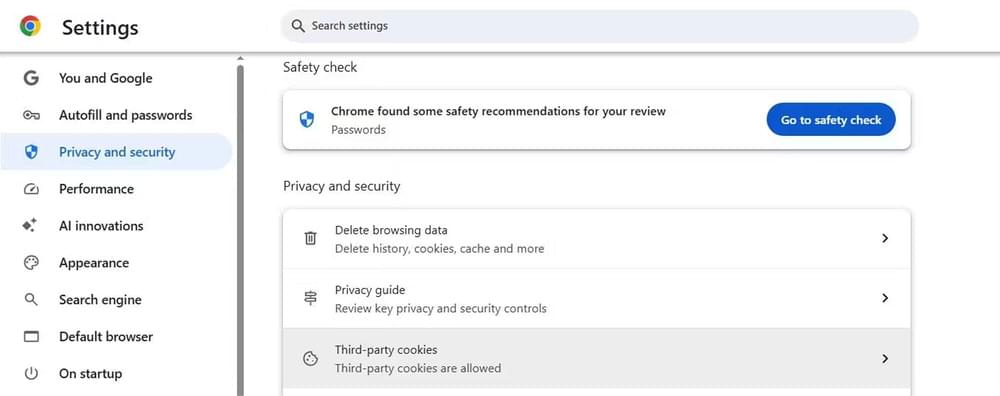
- Select Block third-party cookies.
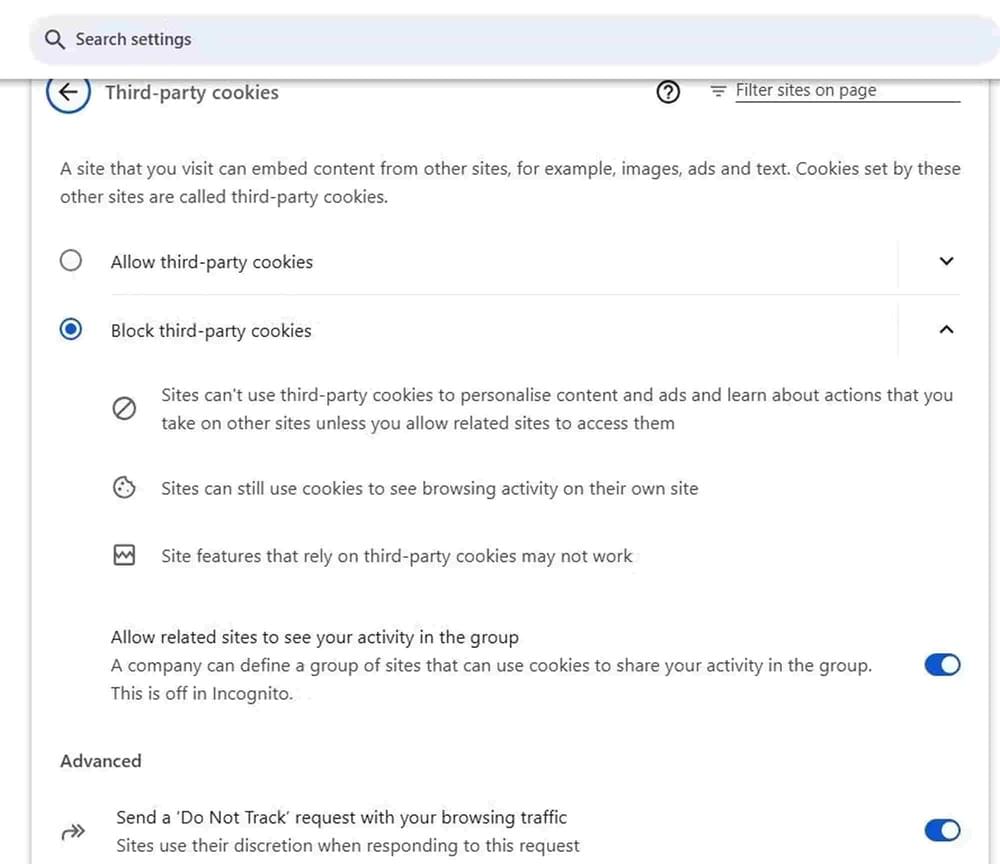
- Optionally, enable Send “Do Not Track” requests.
The last feature is optional and enabling it does not force sites to honor it; however, we still recommend you use it.
How to disable cross-site tracking on Safari?
You must already know that Safari is Apple’s default browser on Mac and iPhone, and that Safari has particularly strong built-in privacy controls to offer its users.
First, let’s see how to prevent cross-site tracking on iPhone or iPad.
- Open ‘Settings’. Scroll down and tap ‘Safari’.
- Go to ‘Privacy & Security’.
- Enable ‘Prevent cross-site tracking’.
- Turn on Block All Cookies if you want even stricter privacy (but this may break some site features).
Here’s how you can disable cross-site tracking on Mac.
- Open Safari.
- Go to Preferences.
- Select the Privacy tab.
- Check the ‘Prevent cross-site tracking’.
With this prevention enabled, Safari will limit third-party cookies and delete some tracking data to make cross-site profiling much harder.
How to prevent cross-site tracing on Edge?
Edge is Microsoft’s famous browser used by thousands of Windows users every day. To stop companies tracking your cross-site activities on Edge, here’s what you can do: click the three dots in the top-right corner and:
- Go to Settings → Privacy, search & services.
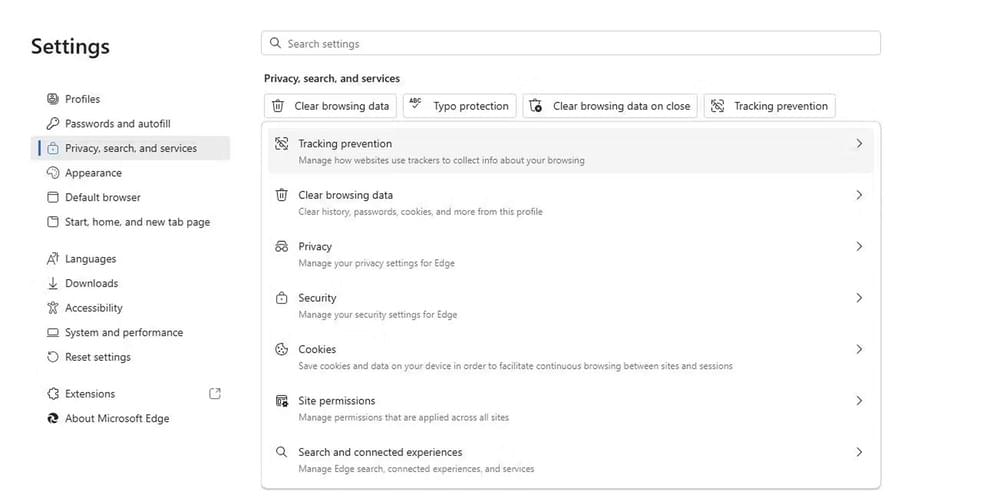
- Click the ‘Tracking Prevention’ option and choose Basic, Balanced, or Strict features after reading the details.
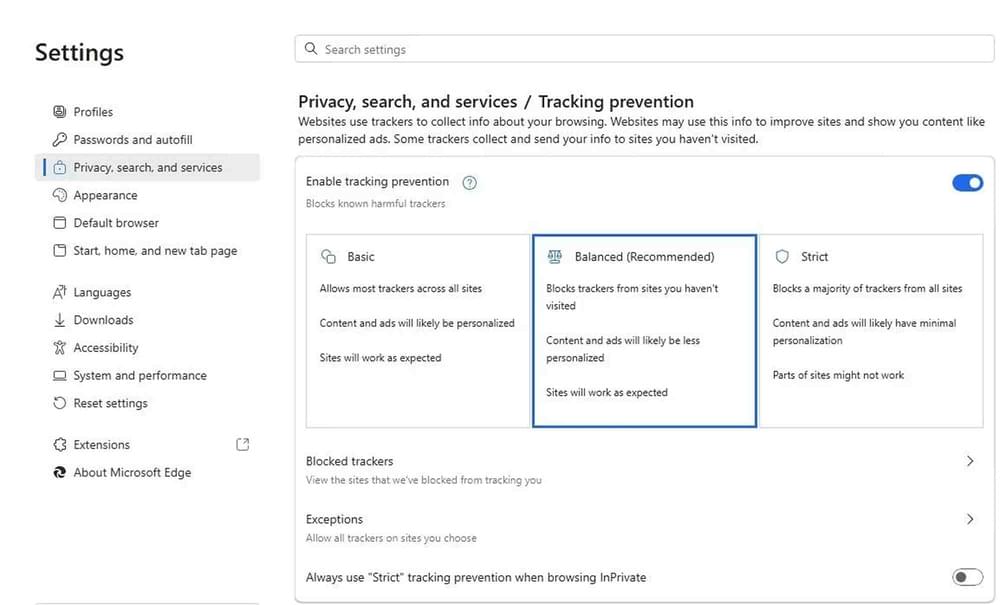
Explore the other options at the bottom of the list for further control over your data.
How to prevent cross-site tracking in Mozilla Firefox?
Firefox is another popularly used browser worldwide and is one of the few that have become particularly aggressive at blocking trackers and fingerprinting.
- Go to Settings → Privacy & Security.
- Under Enhanced Tracking Protection, choose Strict to block many cross-site trackers.
What are the alternative solutions to prevent cross-site tracing of your data?
The first alternative way to limit cross website tracking is by using a VPN like EonVPN. You might be thinking, “Can a VPN prevent cross-site tracking?”
A VPN helps hide your real IP address and device location. This makes your browsing activity harder to link across different websites. While it is not a 100% solution to stop every tracker on its own, it does reduce how much information websites can collect about where you’re browsing from.
Using incognito or private mode is another simple option. This mode does not block cross-site tracking completely, but it does remove cookies and site data once you close the session.
Thirdly, you can also install privacy-focused browser extensions to block trackers directly. Privacy Badger, Ghostery, and uBlock Origin are designed to identify and stop tracking scripts. These extensions work quietly in the background and are an easy way to reduce cross-site tracking without changing your browsing habits.
Conclusion
Complete privacy means sacrificing convenience. If you block all trackers, you might not get features like saved logins, personalized content, or social media embeds the next time you open your browser.
But you absolutely have control and even moderate settings like blocking third-party cookies, using trusted VPN, and using tracker blockers. These solutions can really help you prevent cross-site scripting and protect your online activities without making the internet unusable.
FAQ
What is cross-site tracking?
Cross-website tracking is just another name for cross-site tracking. It is used to highlight user data monitoring happening across different websites, and not just within a single web domain.
What are third-party cookies?
Third-party cookies are the ones causing cross-site tracking. These are the cookies that are loaded from domains/links/web addresses that are different from the one in your address bar.
For example, if you visit a site with an ad from tracker.com, that ad can set a cookie with tracker.com. Then, when you visit a different site that also has content from tracker.com, your cookie tells that tracker where else you have been on the internet.
What does prevent cross-site tracking mean?
Preventing cross-site tracking means that you restrict how websites and third parties follow your activity over different websites. You do this by using the ‘prevent cross-site tracking’ setting of your browser.
Why use the ‘prevent cross-site tracking’ setting?
When this setting is enabled, your browser will restrict third-party cookies and tracking data. This makes it harder for advertisers and data collectors to build a profile of your browsing behavior. This way, more of your habits, behaviour, and device info stays out of their reach.
What is cross-site tracking on iPhone?
Cross-site tracking on iPhone refers to the practice of websites and third-party services monitoring your activity across different websites when you browse using Safari. This monitoring happens through third-party cookies and embedded trackers in your browser.
Use Apple’s built-in option in Safari called “Prevent Cross-Site Tracking,” to help you reduce this kind of tracking on your data. These settings limit how websites can share and reuse your browsing data in the future.
Give me an example of cross-site tracking.
Let’s say you visit an online clothing store. A third-party tracking script from an advertising network sees your visit and drops a tracking cookie in your browser. Later, you go to a news site that uses the same tracking script. Your script will share your browsing history with its sister script, and ultimately, the advertiser owning the tracking script now sees all the data saved in your script. This is cross-site tracking in action.