



SoundCloud unblocked: How to listen on school or work Wi-Fi
Share this post


You open SoundCloud between classes or on a lunch break and the page never loads. Or it loads, shows the waveform, and the track sits there without playing. On a school or office network, that usually means SoundCloud is on the filter’s block list.
Before you try to get around anything, it helps to know what is actually going on, because SoundCloud can fail for reasons that have nothing to do with your Wi-Fi. This guide shows how to tell a blocked network from an outage or a track restriction, and then how to get SoundCloud unblocked on a Windows laptop.
Looking for how to unblock a person on SoundCloud instead? That is an account setting, not a network block, and SoundCloud’s Help Center has the steps. This guide is about getting the site itself to load.
Is SoundCloud down, or is it blocked?
Three different problems look almost the same from your side of the screen. A quick check tells you which one you have.
- SoundCloud is down. It fails everywhere: on the school Wi-Fi, at home and on your phone’s mobile data. Wait it out. No setting on your laptop will fix an outage.
- The network is blocking it. SoundCloud fails on one Wi-Fi network but works on mobile data or at home. You may also see a page with your school’s or company’s name, or the name of a filter product, instead of SoundCloud.
- One track is restricted. The site works, but a single track says it is not available in your country, or only plays a short preview. That is the track’s own setting, not a block.
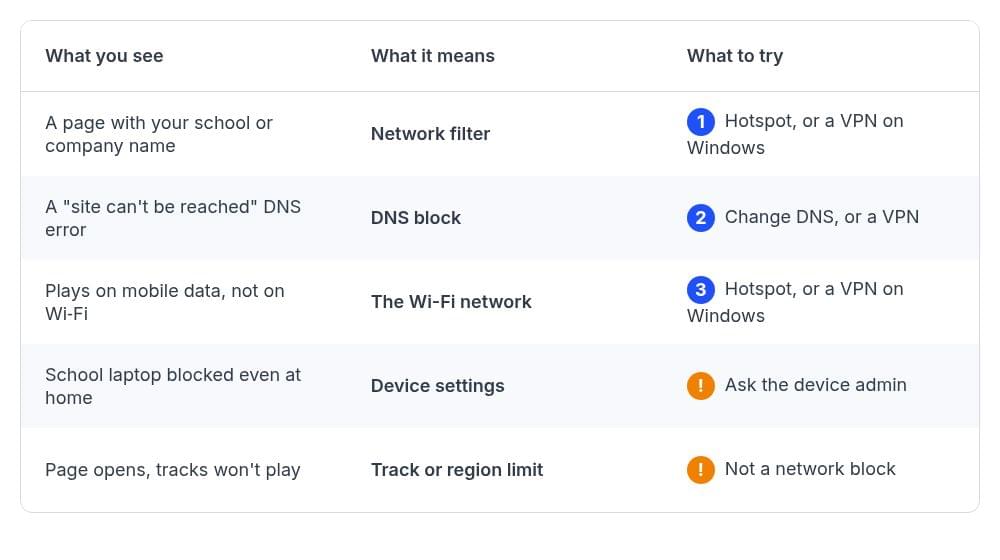
The rest of this guide deals with the second case: SoundCloud works, but not on the network you are on.
Why schools and offices block SoundCloud
Network admins rarely block SoundCloud because of the music itself. The reasons are usually practical:
- Bandwidth. One audio stream is small, but hundreds of students or staff streaming at the same time can slow down the tools a school or office needs.
- Focus. Schools filter entertainment during class time, and SoundCloud often falls into the same “streaming media” category as video sites.
- Uploads from anyone. SoundCloud is open for anyone to upload to, so a filter that cannot check every track for explicit lyrics or comments blocks the whole site.
- Company policy. Some employers allow only the apps their IT team manages, and a personal music account is not one of them.
Most networks do this with a web filter or a firewall. Our guide to web filtering explains how those filters decide what gets through.
How to get SoundCloud unblocked at school or work
Try these in order. The first ones take a minute, and the later ones need a little setup.
Try a different way into SoundCloud
Filters do not always cover every route. If soundcloud.com is blocked, try the SoundCloud desktop player. It installs from soundcloud.com in Chrome, Edge or Brave through the install icon in the address bar, then opens from your taskbar like an app. SoundCloud’s desktop player guide shows the steps. It still talks to the same servers, so it will not beat a strict filter, but it is worth a try on networks that only block the website in the browser.
Also check that your browser is up to date. SoundCloud lists the browser versions it supports in its technical requirements, and an old school browser can fail to load the player in a way that looks like a block.
Switch to your phone’s hotspot
The block belongs to the Wi-Fi, so the fastest fix is to leave it. Turn on your phone’s hotspot, connect your laptop, and SoundCloud should play as it does at home. Streaming music uses far less data than video, but turning down the quality still helps on a small data plan. You can also run a VPN without Wi-Fi over the hotspot if you want the extra privacy.
Use a VPN on your own Windows laptop
When you have to stay on the school or office Wi-Fi, a VPN is the fix that works most often. It sends your traffic through an encrypted tunnel to a VPN server outside the network. The filter only sees a connection to that server, so it cannot match SoundCloud against its block list. The website, the desktop player, the artwork and the audio all travel through the same tunnel.
Some networks also block known VPN connections. If yours does, try a different server or go back to the hotspot. Our article on whether a VPN can bypass Wi-Fi restrictions explains when this works and when it does not.
Change your DNS server
Simpler filters stop SoundCloud at the DNS step: the network refuses to look up soundcloud.com. Pointing Windows at a public resolver such as Cloudflare (1.1.1.1) or Google (8.8.8.8) can get past that kind of block.
- For the whole laptop: open Windows Settings > Network & internet, choose your Wi-Fi network, open Hardware properties and click Edit next to DNS server assignment.
- For the browser only: turn on Use secure DNS in the security settings of Edge or Chrome.
This will not help against a firewall that inspects traffic, and many work laptops lock the setting. If pages stop loading after the change, see how to fix “DNS server not responding”, or flush the DNS cache and try again.
Bring your music with you
If nothing gets through, save tracks before you leave home. On the website, some artists let you download their tracks: if a track has a download button under the waveform, you can save that single track while signed in. Whole playlists cannot be downloaded this way, according to SoundCloud’s downloading guide.
SoundCloud Go and Go+ subscribers can also save likes and playlists for offline listening, but only in the SoundCloud app on a phone or tablet, not on a Windows PC.
Avoid “unblocked SoundCloud” sites
Search for “unblocked SoundCloud” and you will find proxy sites and copies on Google Sites or GitHub that promise access with no setup. Your session passes through a server run by someone you know nothing about, and some of these sites ask you to log in or install an extension. Others are covered in pop-up ads. A web proxy is also a poor fit for streaming audio. Our proxy vs VPN guide explains the difference.
How to unblock SoundCloud with EonVPN on Windows
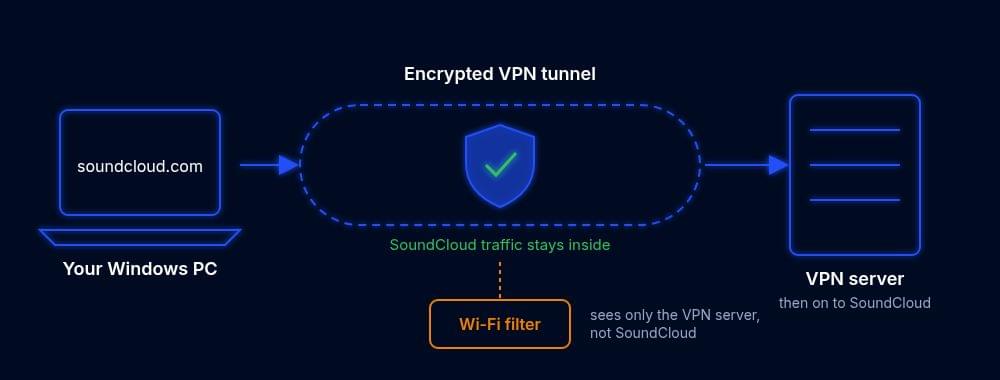
If SoundCloud is blocked on a network you use every day, a VPN on your own laptop is the fix you set up once. EonVPN has a free plan for Windows. It is a Windows app, so it will not help on a Chromebook, phone or tablet.
- Download EonVPN from the download page at home or over your hotspot, since the school or office network may block the installer.
- Install it and create a free account, then sign in to the app.
- Sign in to SoundCloud first if you are not already signed in (see the note below).
- Connect to a server in your own country, or the closest one. A nearby server keeps the delay low, so tracks start quickly.
- Open SoundCloud in your browser or the desktop player and press play. Stay connected while you listen.
A note on signing in: SoundCloud’s spam protection sometimes shows “Our robots think you’re spam” or “Our robots think you’re a robot” when you log in through a VPN, and SoundCloud’s own advice for that error includes turning the VPN off for a moment. Log in first, then connect, or switch to a different server and try again.
New to VPNs? Our step-by-step guide on how to use a VPN covers the basics. Music needs little bandwidth, so the small overhead a VPN adds is rarely noticeable. Here is more on whether a VPN slows down your internet.
SoundCloud unblocked on a school Chromebook
A school Chromebook is a different case. The school manages it through Google’s admin console, and those rules follow the device to every network, including your home Wi-Fi. The admin can block soundcloud.com in Chrome, stop you from installing apps and force a filter extension, so most of the fixes above will not work.
- Test it at home. If SoundCloud works on the Chromebook on your home Wi-Fi, only the school network blocks it, and the hotspot may work.
- If it is blocked at home too, the block is part of the device’s settings, and no network change will remove it.
- Do not reset it to escape the rules. School Chromebooks enroll again after a reset, and you lose your local files.
- Use a device you own for music, such as your phone on mobile data. The same goes for other blocked websites at school.
SoundCloud not working after it loads
Sometimes SoundCloud gets halfway: the page opens, but tracks will not play. These are the usual causes.
“Not available in your country”
Rights holders decide where their tracks can be played, and SoundCloud applies those choices. A track that shows this message is restricted in the country your connection appears to come from. If you see it only while connected to a VPN, switch to a server in your own country. If you see it without a VPN, the track is not offered where you are, and the respectful choice is to listen to something else.
Tracks stop after 30 seconds
Some tracks are part of the Go+ catalogue. You can spot them by the Go+ marker on the track. Free listeners hear a 30-second preview, and the full track plays only with a Go+ subscription. This is not a network problem.
Tracks stall or skip
A partial block can do this, because SoundCloud loads its pages and its audio from different servers and a filter may only catch some of them. Refresh the page, try the desktop player instead of the tab, or switch VPN server if you use one.
Is it OK to unblock SoundCloud?
Getting around a network filter is not a crime in most countries, and using a VPN is legal in most places. Your school’s or employer’s rules are a separate matter. Acceptable use policies often forbid bypassing the filter, and IT staff can usually see that you are using a VPN even when they cannot see what you do through it. Read the policy, and ask whether music is allowed during breaks. If you are curious what your employer can see, read our article on whether your employer can track your location through a VPN.
If you need help with other blocked music apps, our guide to Spotify unblocked covers the same problem for Spotify.
FAQs
How do I get SoundCloud unblocked at school?
First check that SoundCloud is not down by trying it on mobile data. If it works there, connect your laptop to your phone’s hotspot, or use a VPN on your own Windows laptop while you stay on the school Wi-Fi. On a school-managed Chromebook, use your own device instead.
Why does SoundCloud work on my phone but not on the Wi-Fi?
Your phone is probably on mobile data, which does not go through the school or office filter. The Wi-Fi network is blocking SoundCloud, not your account or the app.
Can I get SoundCloud unblocked for free?
Yes. Your phone’s hotspot, a public DNS server and EonVPN’s free plan for Windows cost nothing. Each has limits: the hotspot uses your data, DNS changes only beat simple filters, and EonVPN works on Windows only.
Why does SoundCloud say “Our robots think you’re spam”?
SoundCloud’s spam protection can block a login that looks unusual, which sometimes happens through a VPN. Sign in before you connect, or switch to another VPN server and try again.
Can I download SoundCloud tracks on my PC?
Only tracks that the artist has made downloadable, one at a time, from the download button under the waveform on soundcloud.com. Offline listening for likes and playlists is part of SoundCloud Go and Go+, and it only works in the mobile app.