



What is Tor Browser and is it safe to use it?
Share this post


Although people are increasingly concerned and aware of the results of their online footprints, many users still do not know what is a Tor Browser and why it is used. Just to give you a heads-up on digital trails, when you type a website name into your normal browser, your computer connects directly to that website. This direct connection creates a digital trail or your digital footprint. Your internet service provider (ISP), government agencies, and advertisers can see exactly where you go online.
If you value your online privacy, you should try using Tor Browser. But what is Tor Browser, and is Tor safe to use or not? To understand these queries, we have discussed them in this article and will help you understand how Tor Browser works. Let’s get going.
What is the Tor Browser?
Tor is a free, open-source browser that allows anonymous browsing using a special encryption technique called Onion Routing. Tor is particularly designed to hide user identity and protect their online activity from being tracked, logged, and intercepted.
Tor stands for The Onion Router and is based on Mozilla Firefox. Just like an onion, the Tor network is built out of encrypted layers.
Tor was originally developed and funded by the US Naval Research Lab in the 1990s to protect government intelligence communications. Today, it operates as a non-profit organization dedicated to ‘internet privacy for everyone’, although there are some countries where Tor is restricted.
Not only Tor anonymizes web traffic to cover your browsing, it also hosts anonymous websites and servers using its own network.
These sites use .onion domain extensions and can only be opened inside the Tor Browser. Because the system encrypts both ends of the connection, it hides the identity of the website owner as well as it hides yours. This ability to host and access these hidden sites is exactly why Tor is called a dark web browser.
How does Tor work?
Tor protects your online activity by using a technique called onion routing, which wraps your web traffic in multiple layers of security and sends it through a global network.
When you make a request, Tor heavily encrypts the data packets individually. Then, instead of sending data directly to your requested website, Tor uses its Tor network of volunteer-run servers, known as onion routers or nodes. Each node “peels back” a single layer of encryption, just like peeling an onion. By the time the data reaches your requested website, the last layer is removed, and your request is delivered without ever revealing your original identity or location, etc.
It’s like sending a letter through three different, random helpers who don’t know each other. When you use the Tor Browser, your internet traffic goes through three onion routers every time:
- Entry node: Your browser connects and sends encrypted data to the first volunteer server in the Tor network. This entry node sees who you are with your IP address, but it doesn’t know what website you want to visit. It peels the first layer of encryption to know the address of the middle node and forwards your data to it.
- Middle node: This middle node knows the IP address of the entry node but doesn’t know who you are or what website you are visiting. It just decrypts the next encrypted packet to uncover the address of the exit node and sends your data there.
- Exit Node: The exit node decrypts the last layer of encryption and sends your request to the requested website. Your data leaves the Tor network at this point. The website sees the request coming from the exit node, but it doesn’t know your real identity or location.
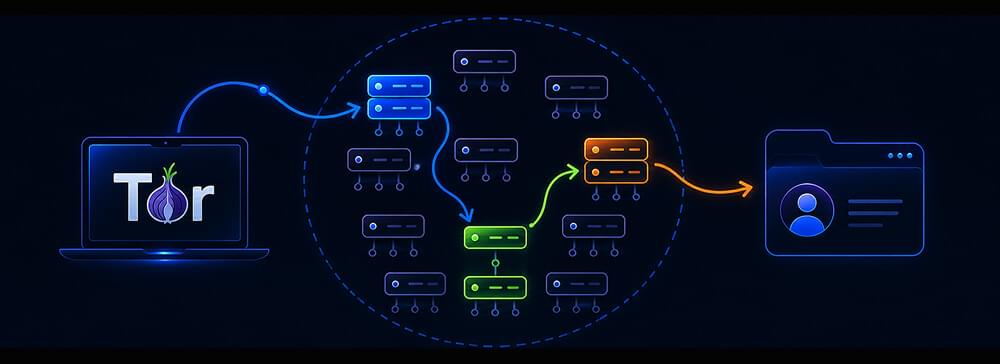
Tor Browser routes your data through three nodes entry, middle, and exit, each stripping one encryption layer before reaching its destination.
Because each node only knows the step immediately before it and the step immediately after it, no single server along the Tor circuit has the full picture of who you are and what you are doing.
Keep reading as we discuss: can Tor Browser be trusted, is Tor Browser safe, how safe is Tor Browser, and what to do if you want to use Tor safely?
Is the Tor Browser safe to use?
Yes, Tor is safe to use when you want complete anonymity.
Academic peer-reviewed research published via MDPI, confirms that Tor’s architecture provides mathematically backed anonymity with onion routing and thick encryption that prevents eavesdroppers from linking your identity to your web traffic.
When using Tor is are safe, because:
- No one can track your location, and your ISP cannot see what websites you visit.
- The Tor Project operates under a strict, public “Social Contract” which promises they will never implement backdoors or compromise the network’s integrity for any authority.
- Tor allows citizens in restrictive countries to access news, educational resources, and social media platforms that their governments have blocked.
Is Tor safe? Practically speaking, Yes it is, if you know what you’re doing.
You can easily change your settings and habits to lock down your data, but Tor still has strict limits. For starters, it doesn’t hide the fact that you are using it. Your internet provider (ISP) and network admin can’t see what you are doing online, but they can see clear as day that you are connected to Tor.
Who uses the Tor Browser? Is Tor Browser for the dark web?
In some movies, Tor is portrayed as a tool exclusively for cybercriminals, but this is a misconception. Digital rights advocates like the Electronic Frontier Foundation (EFF) use Tor as an important tool for everyday human rights.
Here are real-world examples of who relies on Tor as a safe space:
- Journalists and whistleblowers: Investigative journalists use Tor to communicate safely with anonymous sources without revealing their locations. Major news organizations run Tor-accessible dropboxes (like SecureDrop) so whistleblowers can leak documents safely.
- Citizens under oppressive regimes: People living in countries with heavy internet censorship use Tor to access global news, communicate with the outside world, and organize peaceful advocacy.
- Privacy-conscious individuals: Ordinary people who simply do not want tech monopolies, data brokers, or advertisers tracking their medical searches, financial habits, or political views.
Although it is equally true that people use Tor for illegal activities too. It is a popular browser to use the dark web, where underground markets sell everything like drugs, stolen credit cards, pirated movies, and hire-a-hacker services. In fact, Tor first became famous because of the Silk Road, which was a massive, illegal online marketplace that the FBI eventually shut down in 2013.
Limitations and vulnerabilities of Tor Browser
Is Tor actually safe? Mostly, yes. Thanks to onion routing and layered encryption, it provides a high level of privacy. However, Tor is not an all-good security shield. Like any browser, it remains vulnerable to standard cyber threats like malware, phishing scams, and user error.
Here are the primary Tor security concerns and limitations you should know:
- While your data is encrypted inside the Tor network, it is unencrypted as soon as it leaves the Exit Node to travel to an unencrypted website (websites using
http://instead ofhttps://). Anyone monitoring that exit node could spy on your traffic. - Tor can access regular websites, but it can also access .onion sites, commonly known as the Dark Web. Although so much on the Dark Web is legal, it does host marketplaces for illegal activities, unfortunately. Simply surfing the Dark Web is not dangerous normally, but when you click on shady links or download unknown files, you can expose yourself to malware.
- Browser plugins cannot be used.
- Because your traffic is bouncing around three global computers instead of travelling a straight line, your internet speed will feel noticeably slower. Tor is not built for streaming 4K video or online gaming.
- Even on Tor, hackers can still track you using browser fingerprinting. For example, if you visit a malicious site with JavaScript turned on, attackers can actually monitor your mouse movements to build a unique profile of your behavior and figure out who you are.
- File sharing can expose your identity.
- Downloaded documents in Tor cannot be opened if you are online.
How to use Tor safely? Is Tor safe for beginners?
If you want to download and try the Tor Browser, follow these simple safety rules to protect your anonymity:
- Never download the Tor Browser from third-party sites. Always get it directly from torproject.org.
- Tor includes three security settings: Standard, Safer, and Safest. By default, it’s set to Standard, which loads websites normally but you can still be exposed to trickier web-based attacks. Switching to Safer or Safest blocks risky website features, like certain fonts and JavaScript scripts that hackers use to exploit browsers. Just keep in mind that tightening these settings might disable some features of modern websites, like, for example, videos might not play, or some interactive pages will look like text from 1995. But it is one of the best ways to lock down your browser against malware.
- Do not use Tor to log into your personal accounts like Facebook, Google, or your bank account, because then you defeat the purpose of total anonymity. The network hides your connection, but logging in tells the website exactly who you are.
- Don’t change the Tor Browser window size. Tor protects you from “browser fingerprinting”, i.e. websites identifying you via your screen resolution and settings. Leave the Tor window at its default, that is non-maximized size, and stay blended into the crowd.
- Avoid Downloading Files. Downloading PDFs or torrent files while on Tor can expose your real IP address if those files attempt to connect to the internet outside of the Tor Browser network.
- Stick to
https://so that your data remains encrypted even after it leaves Tor’s final exit node. - Run a VPN before you open Tor (Onion over VPN): Tor is great at encrypting what you do and hiding who you are, but it doesn’t hide the fact that you are using Tor. Your ISP, school, or boss can easily see that you are connected to the network using Tor. If you want to keep your Tor usage completely under wraps, you need to turn on a trustworthy VPN first. This setup is called Onion over VPN. Use the desktop-focused EonVPN before opening your browser and create an encrypted tunnel. Your internet provider will now only see regular VPN traffic and will have no idea that you are actually heading into the Tor network. Plus, doing this hides your real home IP address from the very first Tor server you hit, giving you an extra layer of privacy right from the start.
Conclusion
Should you use Tor? Tor Browser is one of the most legally protected and technologically sound tools available for digital privacy. If you are someone looking to browse the web without being tracked, or if you need to access information that is restricted in your region, Tor provides remarkable anonymity.
That being said, you should also understand that anonymity does not always mean security.
However, by understanding what is the Tor Browser network, sticking to Tor’s official links, and avoiding risky downloads, you can browse the web in Tor with total peace of mind.
FAQs
Is Tor the dark web?
No. Tor is just a browser, just like Chrome, Brave, or Firefox. However, while regular browsers only let you visit standard websites like Google or YouTube etc, Tor allows you to access hidden websites that end in .onion. This collection of hidden sites is what people call the “dark web.” You use Tor to get to the dark web, but the browser itself is just a tool for privacy.
Is Tor 100% private?
Nothing on the internet is 100% private, and Tor is no exception. Tor does mask your location and identity, but it can’t protect you a 100%. If you log into your personal accounts (like your Gmail), download files that connect to the internet outside the browser, or turn on JavaScript on a shady website, you can reveal your real identity.
Is it illegal to browse Tor?
Tor is legal to download and use in most parts of the world like the US, UK, and Europe. However, doing illegal things on Tor is still illegal, and a few countries with strict censorship laws like, China and Russia, have banned or blocked the network entirely.