



ChatGPT unblocked: How to use ChatGPT on school or work Wi-Fi
Share this post


ChatGPT is one of the most visited sites in the world, which is exactly why so many school and office networks block it. You open chatgpt.com on campus or at the office and get a block page, an endless loading screen or a message asking you to unblock a Cloudflare address.
This guide explains why ChatGPT gets blocked on school and work Wi-Fi, what to check before you try a fix, and the safest ways to get ChatGPT unblocked on your own Windows PC.
Why is ChatGPT blocked at school or work?
Schools and companies use web filtering to control which sites people can open on their network. AI chat tools are a common target, for a few reasons:
- Schools want to stop students from using AI to write homework or answer tests.
- Companies worry that employees will paste confidential data, code or customer details into a public AI tool.
- Both may simply block whole categories, such as “AI” or “chat”, without reviewing each site.
Filters such as GoGuardian, Securly, Lightspeed or a company firewall usually block ChatGPT by its domain names: chatgpt.com, openai.com and the addresses ChatGPT loads its scripts and images from. If only some of those are blocked, the page may half load and then fail.
Check your school or work AI policy first
Before you look for a workaround, find out what is actually allowed. Many schools now approve AI tools for specific classes, and many companies offer an approved AI assistant through a work account. If you need ChatGPT for coursework or your job, asking the IT team or your teacher is often the quickest fix, and it keeps you inside the rules.
If the network blocks ChatGPT on purpose, getting around the filter can break your school’s or employer’s acceptable use policy. Read the policy and decide for yourself.
How to tell what is blocking ChatGPT
The message you see tells you where the problem is.
- A school or company block page, or “this site can’t be reached” on Wi-Fi only: the local network is filtering ChatGPT.
- “Please unblock challenges.cloudflare.com to proceed”: the network blocks the security check ChatGPT runs before login. See the section below.
- ChatGPT works on mobile data but not on Wi-Fi: the Wi-Fi network is the cause.
- ChatGPT loads but shows a network error or keeps logging you out: this is usually a browser or connection problem, not a block.
Get ChatGPT unblocked with a VPN on Windows
A VPN is the most reliable fix for network filters. It sends your traffic through an encrypted tunnel to a VPN server, so the school or office network only sees a connection to that server and cannot see that you are opening ChatGPT. Websites see the VPN server’s address instead of your real IP address.
To use one on your own Windows PC:
- Download EonVPN, a free VPN for Windows, and install it on your PC.
- Open the app and connect to a server.
- Open your browser, go to chatgpt.com and log in.
- If the page still fails, clear the browser cache or open a private window, then reload.
If you are new to VPNs, our guide on how to use a VPN walks through the basics. To keep your DNS lookups inside the tunnel as well, see how to prevent DNS leaks.
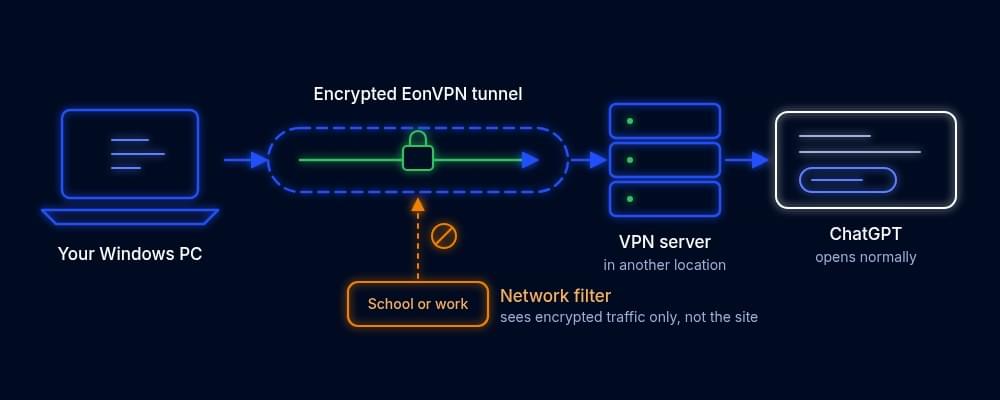
A VPN is legal in most countries, but using one on a school or work network can still break that network’s rules. On a work laptop or a managed device, your activity may also be monitored on the device itself, VPN or not.
Ways to reach ChatGPT without a VPN
If you cannot install apps on the device, these options can still help.
Switch to mobile data or a personal hotspot
A school or office filter only applies to its own network. Turning off Wi-Fi on your phone, or sharing your phone’s connection with your laptop, moves you to your mobile carrier, which usually does not block ChatGPT. Watch your data allowance if you use it for long sessions.
Use the official ChatGPT app on your own phone
OpenAI’s ChatGPT app on your personal phone, on mobile data, is out of reach of the school or office filter. On a lightly filtered Wi-Fi network, the app may also work when the website does not. Strict filters usually block both.
Avoid “ChatGPT unblocked” proxy sites
Search results for “ChatGPT unblocked” are full of sites that offer free ChatGPT without login. These are not run by OpenAI. Everything you type passes through a third party you know nothing about, and many of them break the moment you try to log in. Don’t use them for schoolwork with personal details, work data or anything you would not post publicly. Our guide on how to unblock a website compares proxies, VPNs and other methods.
Please unblock challenges.cloudflare.com: what it means
ChatGPT uses Cloudflare to check that a real person, not a bot, is opening the site. That check loads from challenges.cloudflare.com. Some school and office filters block that address, so ChatGPT stops at a message asking you to unblock it.
To fix it:
- Try a different browser, or turn off extensions such as ad blockers and script blockers, which can block the check too.
- Switch to mobile data. If ChatGPT works there, the Wi-Fi filter is blocking Cloudflare.
- On your own Windows PC, connect to a VPN and reload the page.
- On a managed device, ask the IT team to allow challenges.cloudflare.com. Many other sites use the same check, so this request is often approved.
ChatGPT unblocked for school: Chromebooks and managed devices
School Chromebooks and managed laptops are controlled by the school’s admin console. Students usually cannot install a VPN on them, extensions are often locked, and the filter may run on the device itself, so it follows you even on home Wi-Fi. On these devices, the realistic options are your own phone on mobile data, using ChatGPT on your own computer at home, or asking a teacher about approved access.
On your own Windows PC on school Wi-Fi, a VPN works the same way as on any other filtered network. For more on campus filters, see our guides on how to unblock websites at school, bypassing school restrictions and whether a VPN can bypass Wi-Fi restrictions.
Fixing errors after ChatGPT loads
Sometimes ChatGPT is reachable but still does not work. Try these steps in order:
- Refresh the page and log in again.
- Clear the browser cache and cookies for chatgpt.com, or try a private window.
- Turn off browser extensions, especially ad blockers and script blockers.
- If you are on a VPN, switch to another server. Busy shared IP addresses sometimes trigger extra security checks.
- Check OpenAI’s status page in case the service itself is down.
Conclusion
When ChatGPT is blocked at school or work, first check whether there is an approved way to use it. If there is not and you are on your own Windows PC, a VPN or your phone’s mobile data will usually get ChatGPT unblocked. On a school-managed Chromebook, stick to your own devices. Whatever you choose, follow your school’s or employer’s rules and keep your login away from unofficial ChatGPT sites.
FAQs
How do I get ChatGPT unblocked at school?
On your own device, a VPN or your phone’s mobile data are the most reliable options. On a school-managed Chromebook you usually cannot install a VPN, so use ChatGPT on your own device or ask your teacher about approved access.
Is it allowed to use a VPN for ChatGPT at school or work?
VPNs are legal in most countries, but a school or employer can ban them on its network. Check the acceptable use policy before you connect.
Why is ChatGPT blocked on my work computer?
Many companies block AI chat tools so employees do not paste confidential data into them. Ask your IT team whether an approved AI tool is available.
Are “ChatGPT unblocked” sites safe?
Most are third-party sites, not OpenAI. Anything you type goes through their servers, so avoid them for personal or work information and use chatgpt.com or the official app instead.
Does ChatGPT work with a VPN?
Yes. ChatGPT works over a VPN in most cases. If you see repeated security checks or login problems, switch to another server and clear your browser cache.
Why does ChatGPT say it is not available in my country?
OpenAI only offers ChatGPT in its supported countries and territories. Outside that list, the site shows this message even on an open network. This is OpenAI’s own rule, not a network block.